Estimated reading time: 5 minutes
Key Takeaways
- Slidesgo AI Presentation Maker lets you create professional slides quickly with artificial intelligence and advanced templates.
- You can customize both content and visuals to fit your exact needs.
- The final presentation downloads easily in PPTX format for PowerPoint or Google Slides. It can also extract main points from PDF, DOCX, and TXT documents you upload.
- Perfect for teachers, students, and businesses who need polished results in a few clicks—no technical skills required.
- This doesn’t replace the traditional Slidesgo template library: AI is an enhancement to the already extensive collection (source).
Table of Contents
What is Slidesgo AI Presentation Maker?
Slidesgo AI Presentation Maker is a tool powered by artificial intelligence, turning presentation creation into a fast and highly personalized experience. All you need to do is enter your topic, customize the content, pick a style, and download your ready-to-use presentation for PowerPoint or Google Slides (source).
The key is that Slidesgo’s AI doesn’t just save time—it ensures a professional finish even if you have no design experience.
How does the tool work?
Slidesgo’s workflow is straightforward. Just follow these steps:
- Decide the topic for your presentation and enter it into the AI tool.
- Customize the tone, content, and visuals to your preferences.
- Pick from a variety of stylish templates (clean, minimalist, expressive, and more).
- Download your presentation in PPTX format, ready to edit in the most popular programs.
Slidesgo also lets you upload DOCX, PDF, and TXT files. The AI will automatically analyze them to extract key ideas and convert them into structured slides (more information).
Additional features and limitations
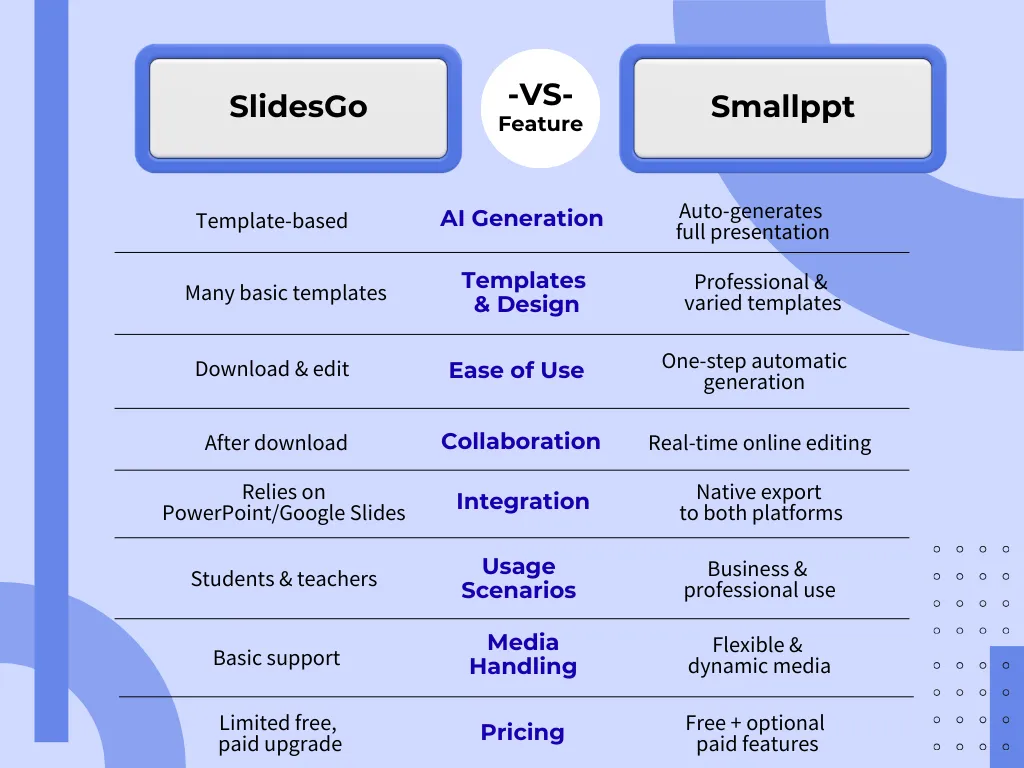
AI is not the only focus: Slidesgo maintains its wide library of pre-made templates. The artificial intelligence works as a complement to streamline the process, not as a total replacement (see source).
Some reviews clarify that the AI tool acts more like an assistant that enhances existing resources, rather than fully generating brand new presentations from scratch—unlike some platforms more heavily focused on pure AI creation.
Among its strengths are features like the AI presentation creator, AI-powered PDF to PPT converter, and the ability to build presentations from uploaded documents. Its uses spread across education, business, and content creation.
In summary, if you want a quick and stylish way to move from idea or document to an editable presentation, Slidesgo AI Presentation Maker is a safe and flexible bet—especially if you already like Slidesgo’s signature style.
Frequently Asked Questions
Can I use Slidesgo AI Presentation Maker for free?
You can try a range of Slidesgo features for free, though premium options unlock exclusive templates and certain AI capabilities.
Slidesgo allows you to upload DOCX, PDF, and TXT files, which are then analyzed with AI to extract the main points and integrate them into your slides.
How is Slidesgo AI different from alternatives like Canva or SlidesAI?
Slidesgo brings AI as an addition to its established template library; others like Canva or SlidesAI might focus more on pure AI generation, but Slidesgo stands out for its styles and user-friendliness.